
Event names are the first thing anyone reads in a product analytics chart. Now they are also the first thing Amplitude’s AI reads when you ask it a question. They are hard to change once data has been collected under them, so they need a decision before the first event ships, not after. We write that decision down as a tracking plan. Below are the naming rules we use, and a demo that shows what they do for a chart and for Amplitude’s AI.
One event per action, details in properties
Track one event for each thing a user does, and put the details in properties. When a shopper puts milk in the cart, the event is “Item added” with item_name set to the product. It is not a “Milk added” event next to a separate event for every other product. One event lets a single chart count every item added, and split the count by any property when you need to.
The same detail also keeps the same property name on every event that carries it. item_name means the same thing on “Item added” and “Item removed”, so you can follow one product across all of them without first working out that product on one event and item on another are the same field.
Write the convention down: your event taxonomy
An event taxonomy is the set of rules your event and property names follow. Ours is short.
Event names: object, then action, in the past tense, in sentence case, with a regular space between words. “Item added”, “Purchase completed”. Putting the object first keeps related events together in an alphabetical list, so “Item added” and “Item removed” sit side by side. The past tense matches what an event is: a record of something that already happened. And a name in sentence case with spaces reads like plain English in a chart legend.
Property names: snake_case. item_name, item_price. Lowercase words joined by underscores can be used as they are in a SQL query, where a name with spaces has to be quoted. The two styles differ on purpose: an event name reads as a sentence, a property name looks like a field.
Names in English, whatever language your team works in. Every team and every tool then reads the same names.
Names that explain themselves
A person or an AI should understand an event or a property from its name alone. A quick test: would a new analyst, or Amplitude’s AI, need to ask what it means? If so, rename it. Two habits help.
- Put the unit in the name where there is one.
item_price_ilsandcart_value_ilssay the currency, so nobody has to guess it. - Start yes/no properties with
is_orhas_.is_loyalty_membercan only be true or false. A property calledloyaltycould as easily hold a tier or a points balance.
The ID that ties a visit together
Put a visit_id on every event in a visit. With it you can pull up one visit’s events in order: the cart starting, every item added or removed and how the visit ended.
Reading the paths, and asking the AI
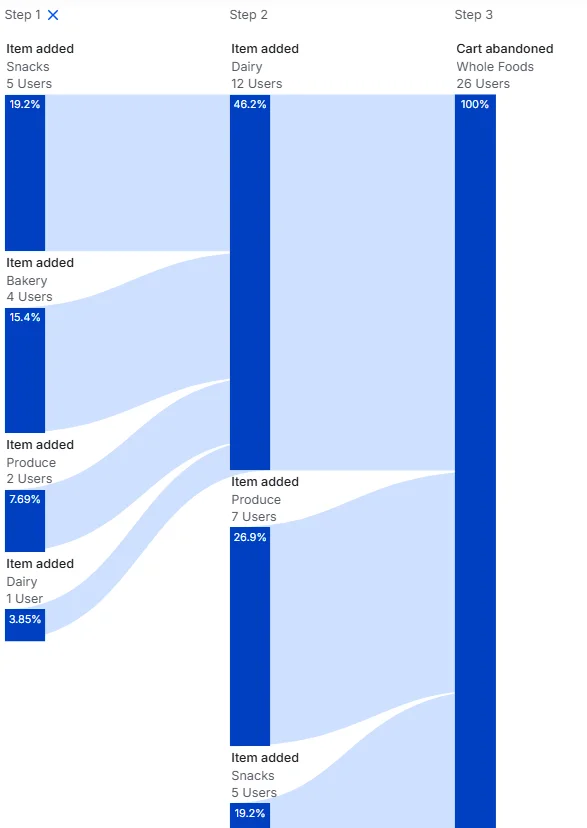
In a demo Amplitude project built on these rules, we made a Pathfinder chart of the paths that end at “Cart abandoned” at Whole Foods, with the last item added before it grouped by item_category. Of 26 users, 12 last added a Dairy item (46.2%), 7 Produce (26.9%) and 5 Snacks (19.2%). The chart needs no legend: “Item added” and “Cart abandoned” say what the user did, and item_category says what Dairy and Produce are.
Then we asked Amplitude’s AI about the same data, in plain words.
You
Look at the last item added before carts were abandoned. Does any item or category stand out?
Amplitude AI
Key Standouts & Differences
- Whole Foods: Heavy Concentration in Dairy & Fresh Goods
- Dairy accounts for nearly half of all last-added items before abandonment at Whole Foods (46.2% / 12 users), followed by Produce (26.9% / 7 users).
- Together, fresh/perishable goods (Dairy + Produce) account for 73.1% of abandonment triggers at Whole Foods.
The question names no event and no property. To answer it, the AI had to match “carts were abandoned” to “Cart abandoned” and “last item added” to “Item added”, then group the items by item_category. Its figures for Whole Foods match the chart, so it found the right event and property.
Amplitude’s documentation says its AI works from the names, display names and descriptions of your events and properties (Amplitude docs (opens in a new tab)). Two more rules follow from that.
- A description for every event and property in Amplitude Data, written as what it means for the business, not how it is implemented. “The visit ends without payment” tells the AI, and your colleagues, what “Cart abandoned” counts.
- No near-duplicates. Merge or hide old and test events, so the AI has fewer wrong events to pick from.
The tracking plan
The tracking plan is where these rules live: one row per event, when it fires and the properties it carries. Here is an example for a smart shopping cart.
| Event | When it fires | Event properties |
|---|---|---|
| Cart started | The shopper starts using a cart | visit_id, store_chain, store_city |
| Item added | An item goes into the cart | visit_id, item_name, item_category, item_price_ils |
| Item removed | An item is taken out of the cart | visit_id, item_name, item_category, item_price_ils |
| Purchase completed | The shopper pays | visit_id, items_in_cart, cart_value_ils, payment_method, minutes_in_store |
| Cart abandoned | The visit ends without payment | visit_id, items_in_cart, cart_value_ils, minutes_in_store |
User properties: store_chain, store_city, is_loyalty_member.
Give each event an owner as well: the person who answers when its numbers look wrong.
Before you ship a new event
- The name is object, then action, in the past tense and sentence case.
- No existing event already covers the same action with a different property value.
- Every property is in snake_case and has the same name it has on other events.
- Units are in the name, and yes/no properties start with
is_orhas_. - It carries
visit_id. - It has a business description in Amplitude Data, and so does every new property.
- It is in the tracking plan, with an owner.
- Old and test versions of it are merged or hidden.
Want a tracking plan your team and Amplitude’s AI can both read? See how we set up product analytics.